

Instant Sales Tax: Real-Time Tax Automation Across All 50 States
TodayPayments.com empowers businesses with real-time, automated tax solutions that simplify compliance, eliminate manual calculations, and deliver seamless, error-free transactions from cart to settlement.
TodayPayments.com is your trusted partner for Instant Sales Tax automation, enabling businesses to streamline the checkout experience while maintaining 100% tax compliance across jurisdictions. Whether you're scaling across states or digitizing your finance stack, we deliver precision, performance, and peace of mind.
Modernize Your Checkout with Real-Time Tax Compliance
In today's multi-jurisdictional digital economy, managing sales tax compliance is a moving target. Whether you're an eCommerce store, SaaS provider, or multi-state retailer, getting sales tax right is critical—but manual methods lead to errors, delays, and audit risks.
That’s where Instant Sales Tax comes in. Built for accuracy, speed, and scale, this solution calculates, applies, and remits sales tax in real time, ensuring a frictionless checkout and automated compliance with local, state, and federal tax regulations—across all 50 U.S. states.
Automate Tax—Elevate Trust, Accuracy, and Growth
Ask us How:
Instant Sales Tax delivers real-time, automated tax calculation and payment solutions that help businesses stay compliant, eliminate errors, and streamline checkout across all states. By integrating directly into checkout or billing workflows, Instant Sales Tax ensures every transaction applies the correct rate—whether it's a local food tax in California or an online service tax in Texas.
Using geolocation and product classification, businesses can automatically assess applicable sales tax across state lines, manage exemptions, and prepare for audit-readiness with full reporting and data logs. This means no more guesswork, lookup tables, or batch spreadsheets to maintain.
With support for real-time API calls, JSON-based calculations, and ISO 20022 batch reporting, you can connect Instant Sales Tax with your CRM, ERP, eCommerce engine, or point-of-sale system seamlessly. Businesses running recurring billing or invoicing cycles can also trigger tax lookups programmatically, improving accuracy and ensuring legal compliance without staff overhead.
Whether you’re operating in 5 states or 50, TodayPayments.com provides the confidence that your checkout, invoicing, and tax filings are handled instantly, correctly, and securely.
Core Parameters
- Calculation Timing: Instant at point-of-sale or checkout
- Jurisdiction Support: All 50 U.S. states + D.C.
- Tax Types: Sales, use, excise, and district-specific taxes
- Integration Methods: API, plugin, or batch file
- Platforms: eCommerce, SaaS, POS, and invoicing software
- File Format Support: JSON, XML, CSV
- Update Frequency: Real-time tax rate syncing
- Compliance Automation: Nexus tracking, remittance filing
Key Attributes
- Real-time sales tax calculation at checkout or invoice
- Automatic application of state, county, and city tax rates
- Support for recurring billing, subscriptions, and POS systems
- Detailed tax breakdown and remittance reporting
- Custom API and plugin options for platforms like Shopify, WooCommerce, and QuickBooks
- Secure, cloud-based processing with audit-ready records
Top Business Benefits
- Ensure compliance with complex multi-jurisdiction tax rules
- Eliminate manual errors and missed rates
- Automate monthly or quarterly tax filings and remittance
- Accelerate checkout with instant tax application
- Gain real-time visibility into tax obligations per transaction
- Integrate with ERP, CRM, and accounting platforms
Platform Features
- Geolocation and ZIP+4 precision for localized tax rates
- Batch upload of taxable items with classification mapping
- Real-time tax holiday and rate change updates
- Nexus monitoring by state and transaction type
- Exportable audit logs and tax reports
- Mobile-optimized API endpoints for embedded applications
Integrating instant sales tax remuneration and reporting into your business processes can greatly improve efficiency and compliance. Here’s a detailed guide on how to implement this for sales at Points of Sale (POS), Mail Order/Telephone Order (MOTO), and E-commerce using QuickBooks Online (QBO):
Integrating Instant Sales Tax Remuneration and Reporting in QBO
1. Understanding the Process
Instant sales tax remuneration involves automatically calculating, collecting, and remitting sales tax to state governments in real time for each transaction. This can be particularly complex given the varying tax rates and regulations across different states.
2. Setting Up Automated Sales Tax Calculation
- Enable Sales Tax in QBO
- Go to the Taxes section in QBO.
- Enable and set up sales tax, ensuring you’ve added all the relevant tax agencies for your business operations.
- Configure Tax Rates
- Set up the correct tax rates for each jurisdiction you operate in. This can include state, county, and city taxes.
- QBO offers automatic tax rate updates, but ensure these are accurate and up-to-date.
3. Integration with POS, MOTO, and E-commerce Systems
- POS Systems
- Ensure your POS system integrates seamlessly with QBO. Many POS systems like Square, Clover, or Shopify POS offer direct integration with QBO.
- Configure the POS system to calculate and apply the correct sales tax rates based on the transaction location.
- MOTO Transactions
- Use QBO to manually enter MOTO transactions, ensuring the correct sales tax is applied.
- Alternatively, integrate with a CRM or order management system that syncs with QBO for automated tax calculations.
- E-commerce Platforms
- Integrate your e-commerce platform (e.g., Shopify, WooCommerce) with QBO.
- Ensure the platform is configured to calculate and collect the appropriate sales tax for each transaction based on the shipping address.
4. Real-Time Sales Tax Remuneration
- API Integration for Instant Remittance
- Use API integration to connect QBO with state tax agencies for instant tax remittance.
- Develop or use existing middleware that can handle real-time tax remittance as transactions are completed.
- Payment Gateways
- Ensure your payment gateways are configured to remit collected taxes to state agencies immediately or on a predefined schedule.
5. Automated Reporting
- Real-Time Reporting
- Set up QBO to generate real-time sales tax reports. Go to the Taxes section, and configure the reporting frequency (monthly, quarterly, etc.) as required by state regulations.
- Use QBO’s reporting tools to track and reconcile sales tax collected and remitted.
- Scheduled Reports
- Schedule automated sales tax reports to be sent to state agencies.
- Use third-party apps like Avalara or TaxJar, which integrate with QBO and provide automated tax reporting and filing.
6. Compliance and Audit Preparation
- Regular Audits
- Schedule regular audits within QBO to ensure all transactions are recorded correctly and sales tax is remitted accurately.
- Maintain detailed records of all sales and tax remittances for compliance purposes.
- Stay Updated on Regulations
- Regularly check for updates in sales tax regulations in the states you operate.
- Ensure QBO and any integrated systems are updated accordingly to remain compliant.
Example Workflow for Instant Sales Tax Remuneration
- POS Sale: A customer makes a purchase at your store.
- The POS system calculates the applicable sales tax and records the transaction in QBO.
- The sales tax amount is instantly calculated and tagged for remittance.
- MOTO Sale: A customer places an order over the phone.
- The order management system calculates the sales tax and syncs the transaction with QBO.
- The sales tax is earmarked for real-time remittance.
- E-commerce Sale: A customer makes an online purchase.
- The e-commerce platform calculates the sales tax based on the shipping address and syncs the transaction with QBO.
- The sales tax is prepared for immediate remittance.
- Real-Time Remittance:
- For each transaction, the sales tax is automatically remitted to the appropriate state tax agency using API integration.
- QBO updates its records in real-time to reflect the remittance.
- Automated Reporting:
- QBO generates real-time sales tax reports, which are sent to the relevant state agencies.
- Scheduled reports ensure all tax obligations are met without manual intervention.
Benefits
- Efficiency: Automates tax calculation, collection, and remittance, reducing manual workload.
- Compliance: Ensures accurate and timely tax payments, minimizing the risk of penalties.
- Accuracy: Real-time updates and integrations reduce errors in tax reporting and remittance.
- Transparency: Detailed records and automated reporting provide clear audit trails for compliance purposes.
By implementing these steps, you can streamline your sales tax remuneration and reporting processes across POS, MOTO, and e-commerce channels, ensuring compliance and improving operational efficiency.
In an era of digital-first finance, tax automation isn't a luxury—it's a competitive advantage. By implementing Instant Sales Tax with TodayPayments.com, you’ll:
✅ Apply sales tax in real
time—based on address, item, and rules
✅ Reduce
audit risk by eliminating tax miscalculations
✅
Automatically remit taxes to the right authorities
✅
Deliver a seamless, trustworthy checkout for every customer
✅ Stay compliant and grow across state lines
confidently
Visit https://www.TodayPayments.com to activate Instant Sales Tax for your business and bring tax compliance into the real-time payment age.
Features & Benefits
FedNow instant payments has benefits for all parties involved in
Financial Transactions.
Benefits to your company include:
Money Transfer: Current limit of $1,000,000 ~ FedNow, $10,000,000 ~ RTP.
It's Fast: 24/7/365 access to funds anytime vs.
several days for paper checks or ACH transfers to process.
Request for Payments ( RfP ™): Mobile & Online Real-Time Bill Payments.
It's Final: All RTP and Instant Payments are Final & Irrevocable.
Software Integration: Integrate your Management
or Enterprise software with us.
Message Detail: Full 145 characters available
using ISO 20022 messaging XML format.
Online Down Payments: Don't use inconvenient
and expensive Wires & Cashier's Checks.
Online Real-Time Reporting: Configured
Dashboard with Virtual Terminal login.
Reduced calls / emails in the "Purchasing Chain": All
parties to a instant payment transaction receive immediately
text & email messaging.
The
FedNow and RTP Systems enables Participants to initiate credit transfers,
receive final and irrevocable settlement for credit transfers,
and make available to Receivers funds associated with such
credit transfers in real-time, twenty-four (24) hours a day,
seven (7) days a week, fifty-two (52) weeks a year. All instant payments are "Credit
Push" instead of "Debit Pull."
Creation Request for Payment Bank File
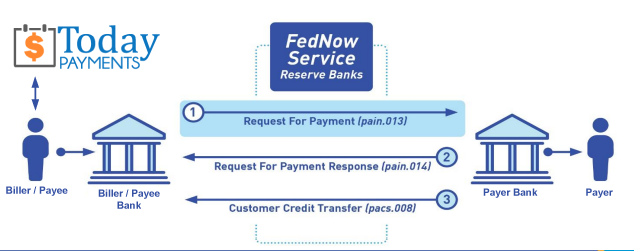
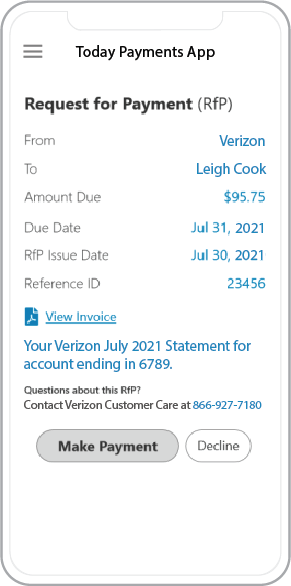 Call us, the .csv and or .xml FedNow or Request for Payment (RfP) file you need while on your 1st phone call! We guarantee our reports work to your Bank and Credit Union. We were years ahead of competitors recognizing the benefits of RequestForPayment.com. We are not a Bank. Our function as a role as an "Accounting System" in Open Banking with Real-Time Payments to work with Billers to create the Request for Payment to upload the Biller's Bank online platform. U.S. Companies need help to learn the RfP message delivering their bank. Today Payments' ISO 20022 Payment Initiation (PAIN .013) shows how to implement Create Real-Time Payments Request for Payment File up front delivering a message from the Creditor (Payee) to it's bank. Most banks (FIs) will deliver the message Import and Batch files for their company depositors for both FedNow and Real-Time Payments (RtP). Once uploaded correctly, the Creditor's (Payee's) bank continues through a "Payment Hub", will be the RtP Hub will be The Clearing House, with messaging to the Debtor's (Payer's) bank.
... easily create Real-Time Payments RfP files. No risk. Test with your bank and delete "test" files before APPROVAL on your Bank's Online Payments Platform.
Today Payments is a leader in the evolution of immediate payments. We were years ahead of competitors recognizing the benefits of Same-Day ACH
and Real-Time Payments funding. Our business clients receive faster
availability of funds on deposited items and instant notification of
items presented for deposit all based on real-time activity.
Dedicated to providing superior customer service and
industry-leading technology.

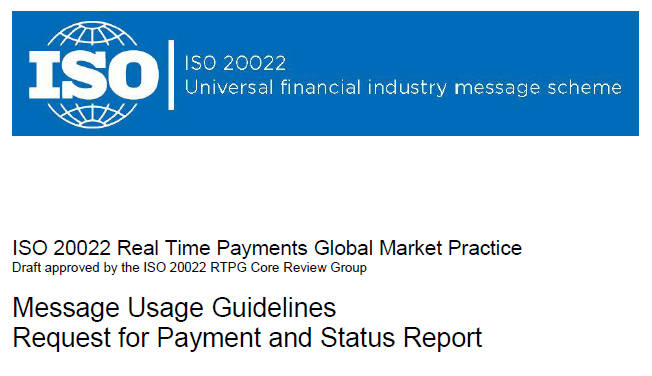
1) Free ISO 20022 Request for Payment File Formats, for FedNow and Real-Time Payments (The Clearing House) .pdf for you manually create "Mandatory" (Mandatory .csv or .xml data for completed ISO 20022 file) fields, start at page 4, with "yellow" highlighting. $0.0 + No Support
2) We create .csv or .xml formatting using your Bank or Credit Union. Using your invoice information database to create an existing Accounts Receivable file, we CLEAN, FORMAT to FEDNOW or Real-Time Payments into CSV or XML. Create Multiple Templates. You can upload or "key data" into our software for File Creation of "Mandatory" general file. Use either the Routing Number and Account Number for your Customers or use "Alias" name via Mobile Cell Phone and / or Email address.
Fees = $57 monthly, including Activation, Support Fees and Batch Fee, Monthly Fee, User Fee. We add your URI for each separate Payer transaction for additional Payment Methods on "Hosted Payment Page" (Request for file with an HTML link per transaction to "Hosted Payment Page" with ancillary payment methods of FedNow, RTP, ACH, Cards and many more!) + $.03 per Transaction + 1% percentage on gross dollar file,
3) Add integrating QuickBooks Online "QBO" using FedNow Real-time Payment using our Instant Sales Tax system.
Fees Above 2) plus $29 monthly additional QuickBooks Online "QBO" formatting, and "Hosted Payment Page" and WYSIWYG
4) Above 3) plus Create "Total" (over 600 Mandatory, Conditional & Optional fields of all ISO 20022 Pain .013) Price on quote.
Each day, thousands of businesses around the country are turning their transactions into profit with real-time payment solutions like ours.
Contact Us for Request For Payment payment processing